
Download CoverFlow APK – 3D Gallery, Multimedia Viewer, Android App, Desktop Alternative
Overview
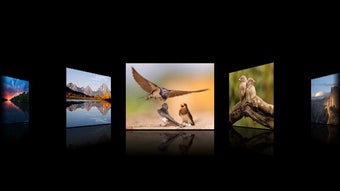
Coverflow is an Android-based multimedia gallery application designed to deliver an immersive 3D browsing experience for digital content. It enables users to explore photos, videos, music files, and PDF documents through a dynamic, rotating interface that mimics the visual flow of a physical media carousel. The app is tailored for individuals seeking a visually engaging alternative to standard file explorers, particularly those managing large multimedia libraries on mobile devices. Its core purpose lies in simplifying access to diverse file types while enhancing visual appeal through animated transitions and customizable presentation effects.
Target users include casual media consumers, digital archivists, and professionals who frequently review visual or audio content on the go. The application supports a wide range of file formats, including common image types such as JPEG, PNG, GIF, BMP, and TIFF, video formats like MP4, AVI, MKV, and WMV, audio files including MP3 and WAV, and PDF documents. This versatility makes it suitable for personal use, educational purposes, and content curation tasks.
Users can designate specific folders for browsing, adjust thumbnail sizes, and customize visual effects such as reflection intensity, gap spacing, and rotation angles. The app also integrates with Picasa, allowing users to access online albums and download content for offline viewing. While the developer is not specified in the provided data, the app has undergone iterative improvements, including the addition of PDF thumbnail support, horizontal scrolling, pinch-to-zoom functionality, and stability fixes.
Key Features & Capabilities
- 3D Rotating Gallery Interface – Presents multimedia files in a visually dynamic, three-dimensional carousel layout, enhancing navigation and engagement.
- Multi-Format Support – Compatible with image formats (JPEG, PNG, GIF, BMP, TIFF), video formats (MP4, AVI, MKV, WMV, MPG, FLV), audio files (MP3, WAV), and PDF documents.
- Customizable Thumbnail Display – Allows users to resize thumbnails and adjust visual parameters such as reflection, gap size, and rotation angle for personalized viewing.
- Picasa Integration – Enables online browsing of Picasa albums and the ability to download photos and videos for offline access.
- Offline Access via SD Card – Supports saving media files locally for viewing without internet connectivity, ideal for travel or low-bandwidth environments.
- Enhanced Navigation Tools – Includes horizontal scroll and pinch-to-zoom gestures for intuitive interaction with large media collections.
These features collectively streamline the process of organizing and accessing multimedia content. For example, a photographer can quickly review a portfolio using the 3D carousel, while a student can flip through lecture PDFs with ease. The integration with Picasa allows remote users to maintain synchronized access to cloud-stored albums, ensuring continuity across devices. The app’s ability to generate thumbnails for images and videos ensures immediate visual recognition, reducing the need to open individual files.
User Interface, Workflow & Performance
The user interface of Coverflow is structured around a central 3D carousel, with media items displayed in a rotating sequence. Navigation is primarily gesture-based, supporting horizontal swipes, pinch-to-zoom, and tap actions to select files. The layout prioritizes visual clarity, with distinct icons for different file types—such as music notes for audio files and document symbols for PDFs—improving recognition speed.
Workflow efficiency is enhanced by the ability to set a default folder for browsing, minimizing repetitive navigation. Users can customize the appearance and behavior of the gallery in real time, adjusting effects like reflection and rotation to suit personal preferences. The app also supports offline viewing, allowing users to cache content from Picasa or local storage for uninterrupted access.
Performance observations are based on general software behavior patterns. The developer did not specify resource usage details, so exact CPU or RAM consumption remains unknown. Stability improvements have been reported in previous versions, including crash fixes and enhanced compatibility with various file types. However, actual performance under heavy usage or on older devices has not been documented.
Compatibility & System Requirements
Coverflow is designed for Android operating systems and is compatible with devices running Android 4.0 and above. The latest version available is 2.0.1, released on June 1, 2016. The application size is not specified in the provided information, and exact system requirements were not listed.
Platform compatibility information is limited. The app requires access to external storage, network state, accounts, credentials, and wake lock permissions—essential for managing cached files, accessing online services like Picasa, and maintaining playback continuity. The developer did not provide additional system requirements. Users should ensure their device meets the minimum Android version and has sufficient storage space for media files and cache data.
Pros and Cons
Pros
- Immersive 3D visual interface enhances media browsing experience
- Supports a broad range of multimedia formats including PDFs
- Customizable thumbnail size and visual effects
- Integration with Picasa for online album access and offline downloads
- Gesture-based navigation with pinch-to-zoom and horizontal scroll
- Offline functionality via SD card storage
Cons
- No information on current system requirements or performance impact
- Latest version released in 2016; may lack modern Android optimizations
- Permissions required may raise privacy concerns for some users
- Limited documentation on update frequency or long-term support
- No indication of cloud sync or cross-device compatibility
FAQ Section
Is Coverflow compatible with all Android devices?
Coverflow is designed for Android 4.0 and later. Compatibility may vary depending on device hardware and software configuration. The developer did not specify exact system requirements.
Can I use Coverflow offline?
Yes, the app supports offline viewing. Users can download media from Picasa or browse files stored on the SD card without an internet connection.
Does Coverflow support PDF files?
Yes, Coverflow can display PDF documents with generated thumbnails, enabling easy navigation and previewing of content.
What permissions does Coverflow require?
The app requests access to external storage, network state, accounts, credentials, and wake lock. These are necessary for saving files, accessing online services like Picasa, and preventing screen saver mode during playback.
Is there a free version available?
The provided information does not specify pricing. Users should verify the app’s licensing model through official sources before downloading.
Final Thoughts + CTA
Coverflow delivers a distinctive 3D multimedia browsing experience tailored for Android users who value visual presentation and intuitive navigation. Its support for diverse file types, customizable interface, and Picasa integration make it a compelling choice for managing digital content on mobile devices. While the app’s last update dates back to 2016, its core functionality remains relevant for users seeking an alternative to standard file explorers.
Despite the lack of updated system details and modern Android optimizations, the app continues to offer a unique blend of aesthetics and utility. It is particularly beneficial for individuals managing photo albums, video collections, or educational materials in PDF format. For those looking to enhance their mobile media experience with a visually rich interface, Coverflow presents a viable option.
Download CoverFlow APK now and transform the way you explore your multimedia files.






.png)
